An HVAC company should buy a shared lead only after comparing it with a page that already asks whether the house has no heat. A shared HVAC lead usually names a person and a vague problem. It does not tell you whether the house has no heat or whether the homeowner wants a tune-up, and a page you control can ask that before a tech is dispatched. The lead is not a cheaper version of that page.
This guide covers what a shared lead contains, what an emergency page can ask, how no-heat differs from a tune-up, and how to decide on the next batch.
Takeaways
- Expect a shared HVAC lead to name a person and a vague problem, not a failure you can dispatch on.
- Ask on your own page whether this is no heat, no cooling, a dead system, or a tune-up, before anyone rolls.
- Treat a tune-up filed as urgent as a dispatch mistake, not as proof you need more names.
- Buy another batch only if your emergency page already sorts those visits and the lead still brings a job the page misses.
- Judge the lead by the blank fields, not by how quickly the phone might ring.
What a Shared HVAC Lead Usually Contains
A shared HVAC lead usually contains a name, a number, a time stamp, and a label that says heating, cooling, or repair. Sometimes it adds one word the homeowner picked from a vendor menu: install, fix, not sure. That menu is not your menu. It does not say whether the furnace is out, the heat pump is blowing cold air, or someone wants a checkup while the system still runs.
The same lead is often offered to other companies at the same time, so your callback is a race, and the person may already be telling the story to someone else. You learn the real visit on that call, if they answer. Until then you do not know whether to send the on-call tech or offer a maintenance slot tomorrow. The lead's urgency flag is a poor guide, because homeowners tap "urgent" when they are annoyed and vendors pass that tap along.
Open a recent batch and mark the blanks. Did it say no heat or no cooling? Did it say the indoor unit was running? Did it say the house still has heat and the caller wants a tune-up or a replacement conversation? If those lines are empty, the lead did its job as a lead and failed as an intake, and you will do the intake yourself on the phone after you have already paid for the name.
A lead that mentions equipment is still vague until it mentions the condition. "Air conditioner" and "furnace" are objects. "No cooling since last night" and "I want a filter plan" are visits. Your dispatcher cannot load a truck from the object alone, because a filter, a refrigerant problem, a failed board, and a maintenance checklist are different loads. The page you control is where that choice should happen, and the shared lead rarely attempts it.
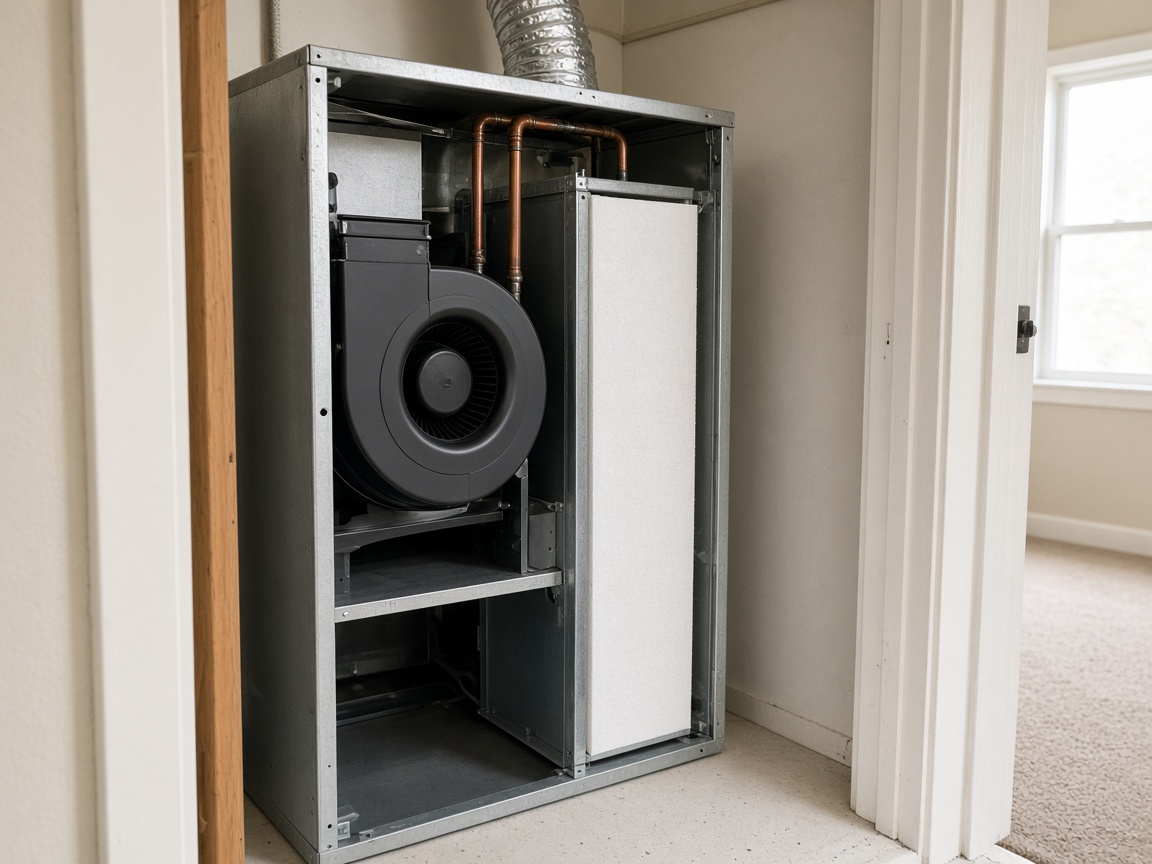
The indoor half of a home HVAC system: an air handler in a utility closet.
What the Emergency Page Can Ask Before Dispatch
The emergency page can ask the question the lead skipped, and it can ask it before a tech is dispatched. The useful question is whether the house has no heat, no cooling, a system that will not start, or a hot smell at the equipment, versus a tune-up or maintenance plan. That single fork changes the truck and the clock.
Put the fork in choices, not in a comment the caller might leave blank: no heat; no cooling; will not start; hot smell at the furnace, air handler, or outdoor unit; system is running and I want it checked. The last choice should leave the emergency form and land on the maintenance path in the office queue, without paging the on-call tech. If it stays on the emergency form, you have rebuilt the vague lead on your own site.
Ask the condition in the same pass. Is the indoor blower running? Is any air coming from the registers? Is someone in the house who cannot wait until morning? Where should the tech go, and which number will be answered tonight? A dispatcher who sees those answers can roll, or book first light, without a discovery call, while one who sees a shared lead still has to make that call and may lose the homeowner while doing it.
This is the split the HVAC page is for selling, while this article teaches the comparison. The selling page can offer the visit, and your emergency page has to ask which visit. Other trades sit on the Home Services page and should not be folded into this HVAC question, since a plumbing leak and a roof opening are not no-heat calls and a bought HVAC lead will not sort them either.
How No-Heat Differs From a Tune-Up
No-heat and a tune-up are different notes, different queues, and different promises. A shared lead collapses them into "repair," and your page should refuse the collapse, or buying the lead imports it into the shop.
| Signal on the note | No-heat or no-cooling path | Tune-up or plan path | What dispatch should do |
|---|---|---|---|
| House has no heat or no cooling | Yes, that is the visit | No | On-call tech, confirm, then roll or set first light |
| System will not start or thermostat is dark | Yes | No | Same night path as no heat |
| Hot smell at the equipment | Yes, stop running it | No | On-call tech, same hour |
| System still runs, wants a checkup | No | Yes | Office queue in the morning |
| Wants options for a new system | No | Estimate, not a night roll | Book a conversation, do not dispatch |
Use the table on a live lead before you call. If you cannot place the lead in a row, the lead failed to ask, and your first question on the phone is the fork. Write the answer into your own note so the tech is not guessing from a vendor label. If your emergency page cannot place its own submissions in a row either, fix the page before you compare costs in your head, because you do not yet have a page to compare the lead against.
The dangerous mix is a tune-up marked urgent. The tech arrives to change a filter or talk about a plan while a different house with no heat waits. Shared leads produce that mix because the vendor's form is built to capture a person who might buy HVAC work of any kind. Your form can be built to capture one kind at a time, which is the advantage, but not an automatic one: a page titled "emergency" with a form that says "describe your issue" performs like the vendor.
How to Decide on the Next Batch
Decide on the next batch by laying about ten recent leads next to your emergency submissions and seeing which stack already knows the visit. Skip any number you do not have, and use the shape of the notes.
- Take a recent set of shared HVAC leads and mark whether each one says no heat, no cooling, dead equipment, a hot smell, or a tune-up.
- Take the same number of emergency-page submissions and mark the same five possibilities.
- Count how many leads would have dispatched a tech before you knew the visit, if you had trusted the vendor label.
- Count how many page submissions still needed a discovery call, which means the page is not asking yet.
- Buy another batch only if the page already sorts the fork and the leads bring a job that page is not built to hear.
Step three is the dispatch test. A label of "repair" plus a phone number is not permission to roll. If your habit is to roll anyway because the lead was marked urgent, the batch is creating night trips for tune-ups, so stop that habit before you buy more of it. Step four keeps you honest about the site: owners blame the vendor for a vagueness their own form copies. If both stacks need a discovery call, adding leads adds calls without adding clarity.
Step five is the narrow yes. A builder who only calls vendors, or a property desk that will not use your form, can be a job your page never sees. Write that job down before you renew. "The schedule looks light next week" is how tune-ups and no-heat calls get purchased as one product, so make the next batch a specific hole, not a mood about the phone.
Why the Lead Is Not a Cheaper Page
The lead is not a cheaper version of the emergency page, because it does not do the page's job. A cheaper version would ask the same question, earlier, with less effort in the shop. A shared HVAC lead asks less, and asks it in a way you cannot correct. You still spend the callback, the sorting, and sometimes the wrong dispatch, while a page that forks no-heat from tune-up spends those minutes once, in the form, before anyone drives.
You also cannot edit the vendor's question when your techs change how they triage. If you stop rolling for a filter complaint at night, the vendor form will keep sending filter complaints with an urgent flag. Your page can move that choice to the maintenance path the same day, but the lead will not move with you, and every renewal reimports the old mix.
Keep the emergency page and the maintenance page as the things you improve when the notes are wrong. If submissions still say "help with HVAC," the choices are too soft or the homepage form bypasses them, and a lead purchase will not close that bypass. It will add a second pile of "help with HVAC" notes beside the first.
When the page is honestly sorting, you can look at a lead offer without mythology. You will see a person and a vague problem, and you will know your own form would have asked for the rest. Buy the name only when that rest is a job you chose not to put on a door. Otherwise the page you control is the enquiry, and the lead is a callback you still have to invent.
Questions
What Does a Shared HVAC Lead Usually Include?
A person, a number, and a vague problem such as "repair" or "heating." It usually does not say whether the house has no heat or the homeowner wants a tune-up. You discover that on the callback, after a tech may already be in play.
What Can the Emergency Page Ask Before a Tech Is Dispatched?
Whether this is no heat, no cooling, a system that will not start, a hot smell at the equipment, or a system that still runs and needs a checkup. The checkup choice should leave the night queue, and the failure choices should reach the on-call tech with a callback and an address.
How Should Dispatch Treat an Urgent Tune-Up?
As a day-book visit unless the note shows a real failure. A vendor urgency flag is not no heat. Rolling a checkup at night trains the wrong promise and leaves an actual no-heat house waiting.
When Is Another Batch of HVAC Leads Reasonable?
When your page already sorts no-heat from maintenance, and the leads bring a job that page is not built to hear. If both the leads and the submissions need a discovery call, fix the page first, since another batch only copies the blur.
Why Is a Lead Not a Cheaper Emergency Page?
It does not ask the fork, and you cannot correct its question when your triage changes. You still pay in callbacks and mistaken dispatches. The page asks before the truck moves, while the lead arrives after that chance has passed.
Conclusion
A shared HVAC lead names a person and a vague problem, and it does not say whether the house has no heat or the homeowner wants a tune-up. A page you control can ask that before the tech is dispatched. The lead is not a cheaper version of that page, and another batch will not become one.
When you are ready to decide whether a bought lead is a substitute for a page that already sorts no-heat from maintenance, Speak With Us.